


Suppose you’re already familiar with Garmin’s dive computers. In that case, I want you to imagine that the Descent Mk3s, with its vibrant color touchscreen, and the Descent G1, with its reasonable price tag, had a love child — and so, the Garmin Descent G2 was born.
When Garmin offered me the G2 for review, I expected a straightforward upgrade from the G1 Solar I tested in April of 2023. What I got instead was a dive computer so impressive that it’s making me reconsider my go-to choice for dive computers. Here’s why the G2 might be the freediving companion you’ve been waiting for!
First Impressions

I opened the box to see a rugged, matte-black dive computer. Its body style closely resembles the black G1 solar, but with a few key differences. Gone was the small circular window at the top right of the screen; instead, a vibrant sapphire display. The bezel and case are made from fiber-reinforced ocean-bound plastic — a thoughtful touch!
The black Descent G2 strikes a more refined yet still sporty balance in terms of looks. At 45.5 x 45.5 x 15.2mm, it works for daily wear without screaming “dive gear,” making it perfect for smaller wrists or people who want an everyday watch.
Setting it up was a breeze — a QR code on the watch face opened my Garmin Connect app and quickly transferred all of my settings from my old Descent Mk2s — nice! The touchscreen is responsive, although I still find myself pressing buttons out of habit.
Dive Screens, Alerts, and Logs

The dive computer’s AMOLED display is easily visible in direct sunlight, with a customizable in-dive screen that shows dive time, current/maximum depth, heart rate (HR), ascent rate, and temperature. Underwater, the screen is just as clear!
Alerts and Alarms
While I only use alarms for my mouthfill charge, top-up, and freefall, the Descent G2 offers more: target depth, neutral buoyancy, high/low speed (0.5m/s intervals), variometer (alert every ‘x’ meters), surface timer, and standard depth alerts. The alarm tone is clear even when worn on the wrist, and the vibration against my bare skin is impossible to miss.
Post-Dive Analysis

What impresses me the most is the amount of data you can immediately see on the Descent G2’s screen after your dive. As someone who closely tracks HR patterns, I’ve dedicated an entire screen to my last dive’s HR metrics: beginning, average, minimum, and maximum readings. Since I primarily train FIM, tracking speed has become more critical than ever as I go deeper. The G2 displays ascent and descent rates, as well as any hang times, and the accuracy is spot on! Check out all of the dive screen information available, which I listed under “Features” at the end of this review.
Dive Log


The dive log includes all the essentials: max depth, dive time, ascent/descent rates, and heart rate and temperature charts. However, it gets even more extensive — I can also label my dives by discipline, either directly in the app or on the Descent G2 before diving, and add notes, buddy names, dive site, photos, conditions, and more. I used to have a Microsoft Word document as a training journal, but now I can do all my journaling directly on the app!
The real game-changer for me is seeing velocity data for every second of my dives. I can see precisely where my freefall slowed, or where I got a little lazy on my ascent or descent. I love that I no longer need to do any calculations by hand to understand my speed at different points of my dive!
GPS
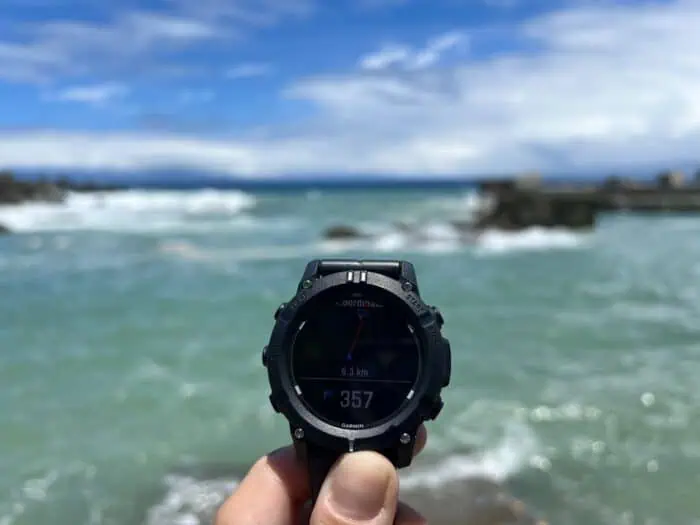
The Descent G2 features GPS, which I often use to locate underwater mooring lines to attach to while freediving. The G2 acquires a GPS signal almost instantaneously, and navigation to a dive site is straightforward: the screen displays my location, the dive site’s location, and a straight red line connecting the two. The remaining distance appears in large numbers at the bottom, making it easy to see how far away I am from the mooring lines at all times.
I can mark each dive site with a specific icon and customize the name. If I forget to mark a dive site, no problem — each dive automatically saves entry and exit coordinates in the dive log, which I can input directly into the G2 and navigate to for future dives!
Battery Life and Connectivity
The Descent G2 delivers solid battery performance for a touchscreen dive computer, lasting up to 10 days with the always-on display disabled — a claim I found quite accurate. The watch face also lights up quickly with a flick of the wrist.
The Bluetooth connection to my iPhone (Android is also supported) is reliable, providing me with every notification I need, including calls, texts, calendar alerts, social media notifications, and more. I do miss the ability to store music directly on the device for phone-free runs and bike rides, but it’s reasonable considering the reduced price tag.
The G2 also includes NFC — Garmin Pay — making it easy to grab a post-dive convenience store coffee when I don’t have my phone or wallet!
Heart Rate Measurement
I find the HR measurement on the Descent G2 to be quite accurate: at the doctor’s office, I have resting HR measurements of 38–39bpm, and my G2 consistently shows 39 and in the low 40s on average. It also seems to match my perceived effort during activities like running and cycling.
While wrist-based HR measurement is not as precise underwater, I still find it valuable for spotting patterns in my dives. If you want more accurate readings during your dives, you can pair the G2 with Garmin’s HRM-Swim chest strap, which is stated to work up to 40m (131ft).
Fitness Tracking Features

Outside of diving, the Descent G2’s fitness tracking is phenomenal. The Garmin Connect app provides me with all the essential metrics: steps, floors climbed, stress levels, sleep score, HRV (heart rate variability), and even accurate menstrual cycle tracking. When I connected it to MyFitnessPal, it displayed my daily calories and adjusted them according to my activity level.
The Morning Report feature is also a nice touch — I wake up to a detailed daily summary on my screen, which includes dive readiness, training readiness, recovery hours, suggested workouts, sleep score, HRV status, weather, and calendar events.

Activity options are plentiful: yoga, running, skiing, triathlon, and hiking, to name a few. After a workout, it analyzes my fitness level, training load, recovery time needed, and whether my session was primarily aerobic or anaerobic. I can also choose specific workouts for running, strength training, cardio, yoga, Pilates, or HIIT, or create my own.
For freedivers who want to cross-train or improve their overall fitness, the Descent G2 tracks it all, not just your underwater adventures!
Final Thoughts

The Descent G2 strikes the delicate balance between price point and functionality, not only in the water but also on land.
It’s an actual fitness tracker/smartwatch/dive computer with many of the same comprehensive features as the Garmin Descent Mk3 but without the premium price tag (albeit with a more rugged look). At 700USD, compared to similarly priced contenders from Suunto, Huawei, and the Apple Watch, the Descent G2 offers the best freediving features in its price range
For freedivers who want serious underwater capabilities without shelling out more than 1,000USD on the Mk3 series, the Descent G2 hits the sweet spot! It’s not just cheaper than the competition — it’s often better equipped for the freediving functions you need most.
Key Features
- Dive Modes: Single-Gas, Multi-Gas, CCR, Gauge, Apnea, Apnea Hunt
- Apnea Dive Mode Disciplines: CWT, CWTB, CNF, FIM, VWT, NLT, S&E (Speed and Endurance), STA, DYN, DYNB, DNF
- Customizable Apnea/Apnea Hunt Data Surface Screen Options:
- Maximum Depth
- Last Dive Depth
- Surface Time
- Time of Day
- Stopwatch
- Dive Number
- Last Dive Time
- Last Dive Ascent Time
- Last Dive Descent Time
- Last Dive Hang Time
- Total Dive Time
- Last Dive Average Ascent/Descent
- Last Dive Ascent/Descent Time
- Last Dive Hang Time
- Last Dive Max. Ascent/Descent Rate
- Heart Rate
- Heart Rate Chart
- Average Heart Rate
- Last Dive Avg./Min./Max. Heart Rate
- Last Dive Beginning/Ending Heart Rate
- Current/Min./Max./Avg. Temperature
- Last Dive Min./Max./Avg. Temperature
- Battery Level
- Current Location on a Map
- Apnea/Apnea Hunt In-Dive Screen:
- Elapsed Time
- Current Depth
- Maximum Depth
- Current/Avg. Heart Rate
- Ascent Rate
- Current/Min./Max./Avg. Temperature
- Apnea Alerts:
- Target Depth
- Neutral Buoyancy
- Surface Timer
- Variometer (every ‘x’ meters)
- High Speed (intervals of 0.5m/s)
- Low Speed (intervals of 0.5m/s)
- Start/Stop
- Depth Alerts
- Dive Log
- Surface Multi-GNSS
- Wrist-Based Heart Rate/Stored Strap Data
- Pulse Ox Sensor (spot-check, during sleep, all day)
- Smart Notifications
- Connect IQ Store
Technical Specifications
- Touchscreen Sapphire Crystal Lens
- 5 x 45.5 x 15.2mm (1.8 x 1.8 x 0.6in)
- 2” (30.4mm) diameter display size
- 390 x 390 Pixel Display Resolution
- Fiber-Reinforced Ocean-Bound Plastic Bezel and Case
- Silicone Strap
- QuickFit™ Watch Band Compatible
- Rechargeable Battery
- Battery life
- Smartwatch: Up to 10 days (4 days always on)
- Battery Saver Watch Mode: Up to 12 hours
- Dive Mode: Up to 27 hours
- Weight: 65g (2.3oz)
- Water Rating: Dive 100m (328ft)
- 4GB Memory/History
Price
– $700 USD / €620 EUR / £527 GBP
Buy It Now
 Wearable4U Garmin Descent G2 Watch-Style Dive Computer Smartwatch Black with Black Silicone Band, AMOLED Display, Diving PowerBank Bundle
The Garmin Descent™ G2 is a rugged, watch-style dive computer designed for both your underwater adventures and everyday life. It’s engineered for divers of all levels, providing advanced tracking, health monitoring, and smart features in a sustainable, eco-friendly design. Whether you’re diving into the deep blue or heading out for a run, the Descent™ G2 is the ultimate companion for your active lifestyle.